Robert Tideswell

Chart Nº 1

Write to me

Robert Tideswelltideswell.dev · Lincolnshire

I build the software small businesses run on. And the odd thing, purely for joy.

Chart Nº 1 — selected work Soundings in lines of code Light Fl(2) 5s — the i

Robert Tideswell

↓ See the work

At a glance

At a glance

Everything I've built, in one place. Some of it runs real businesses every day, a café's till and a furniture shop's back office among them. Some began as pitches, and the rest I built for myself.

Lines of code across the work
210,000+
Automated checks that must pass
2,036
Dependencies in the café's till
0

01 — What I do

Websites, tills and software, for people who just want it to work.

I'm based in Lincolnshire, but I'll work with small businesses anywhere in the UK.

Also

  • Web solutions
  • Website care
  • Online shops
  • Stock & back office
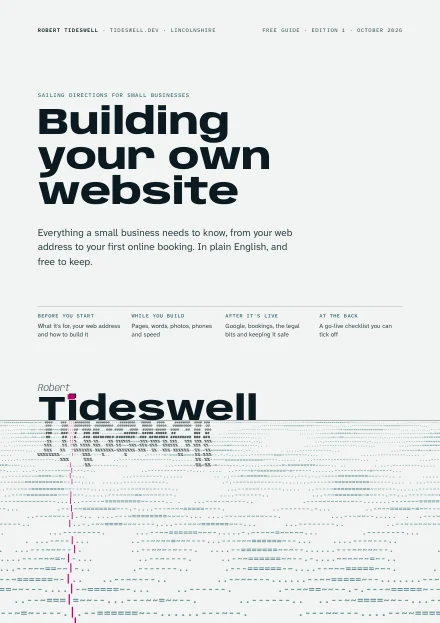
Free guide · PDF, 18 pages Building your own website? Everything I'd tell a friend who was doing it themselves, from your web address to your first online booking. It's free to keep, with nothing to sign up to. Download the guide

02 — The work

Chart Nº 1: my work, as a map.

Each island is a project, sized by how much code went into it. Drag the glass over one for a closer look, then click to go ashore.

  1. MobelSuite121,271Software for running a furniture shop. Used every day, not on sale yet.Go ashore ↓
  2. Park office23,400Software for running holiday-home parks. Built as a pitch.Go ashore ↓
  3. Tea-room till17,220The till and back office a café and tea room runs on.Go ashore ↓
  4. Tattoo studio4,905A wall of 407 tattoos that come into colour as you look.Go ashore ↓
  5. Tattoo supplies2,760A shop that shows every needle from the tip. Built as a pitch.Go ashore ↓
  6. Bargain Bin6,300A shop that stocks itself.Go ashore ↓
  7. RuneAdvisor3,962An AI coach in a RuneScape sidebar.Go ashore ↓
  8. Code Crypt5,258A dungeon that teaches Python.Go ashore ↓
  9. GE dashboard4,966Tells you what's worth flipping on the Grand Exchange.Go ashore ↓
  10. The comfy page2,207A secret 1999-style page hidden in a furniture shop's website.Go ashore ↓
  11. MouseRecorder976Records clicks and plays them back.Go ashore ↓
  12. Realm of Scripts18,524A 3D game where every spell you cast is real Python. Invite only.Go ashore ↓
  13. Coastal Dream Radio2,113A website where the sea moves to the live radio.Go ashore ↓
  14. Kitchen maker4,476A family kitchen maker's website, with an editor they can run from their phone.Go ashore ↓

High water · choose an island and the tide goes out

Till & back office · for a café and tea room

A till that knows what goes off first.

Before this, the café ran on a till, a stock spreadsheet, a rota pinned to the wall, a tub of date dots and a notebook for the cash. Now it's one system. A PC in the back room runs the server, and the tablets in the shop connect to it over the local network, so it keeps trading when the broadband drops. There's no subscription and no fee per tablet.

Lines of code
17,220
Dependencies
0
End-to-end tests, each a full trading day
22
API routes, each with its own permissions
118
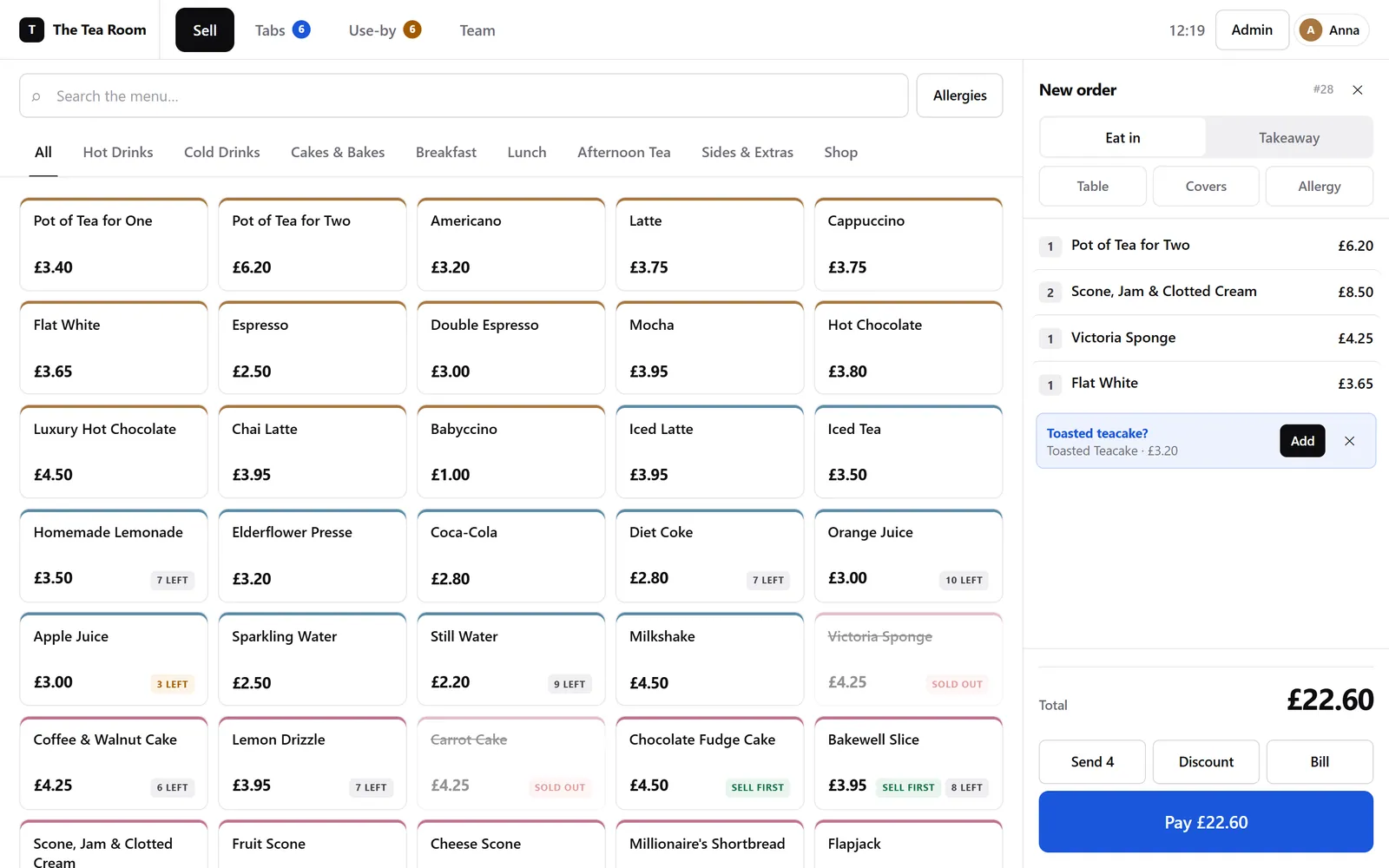
The till's sell screen: a grid of menu items with prices and stock badges such as 'Sell first' and '7 left', and an order on the right totalling £22.60 with a prompt suggesting a toasted teacake.
The sell screen. The stock badges come straight from the use-by dates, and the teacake is the till suggesting an add-on.
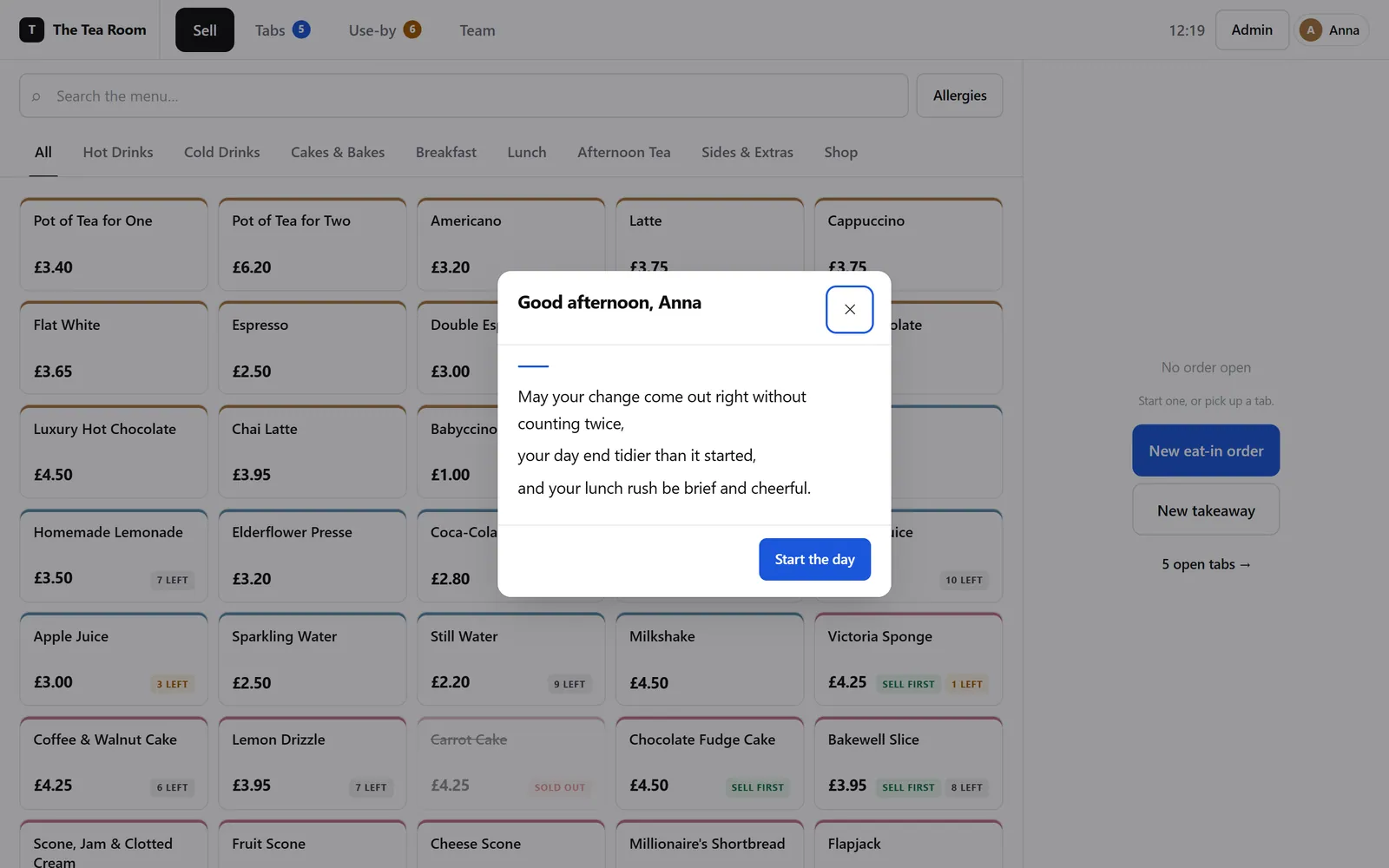
A greeting on the till: 'Good afternoon, Anna. May your change come out right without counting twice, your day end tidier than it started, and your lunch rush be brief and cheerful.'
Staff get a short poem the first time they sign in each day. It's the same one on every tablet.
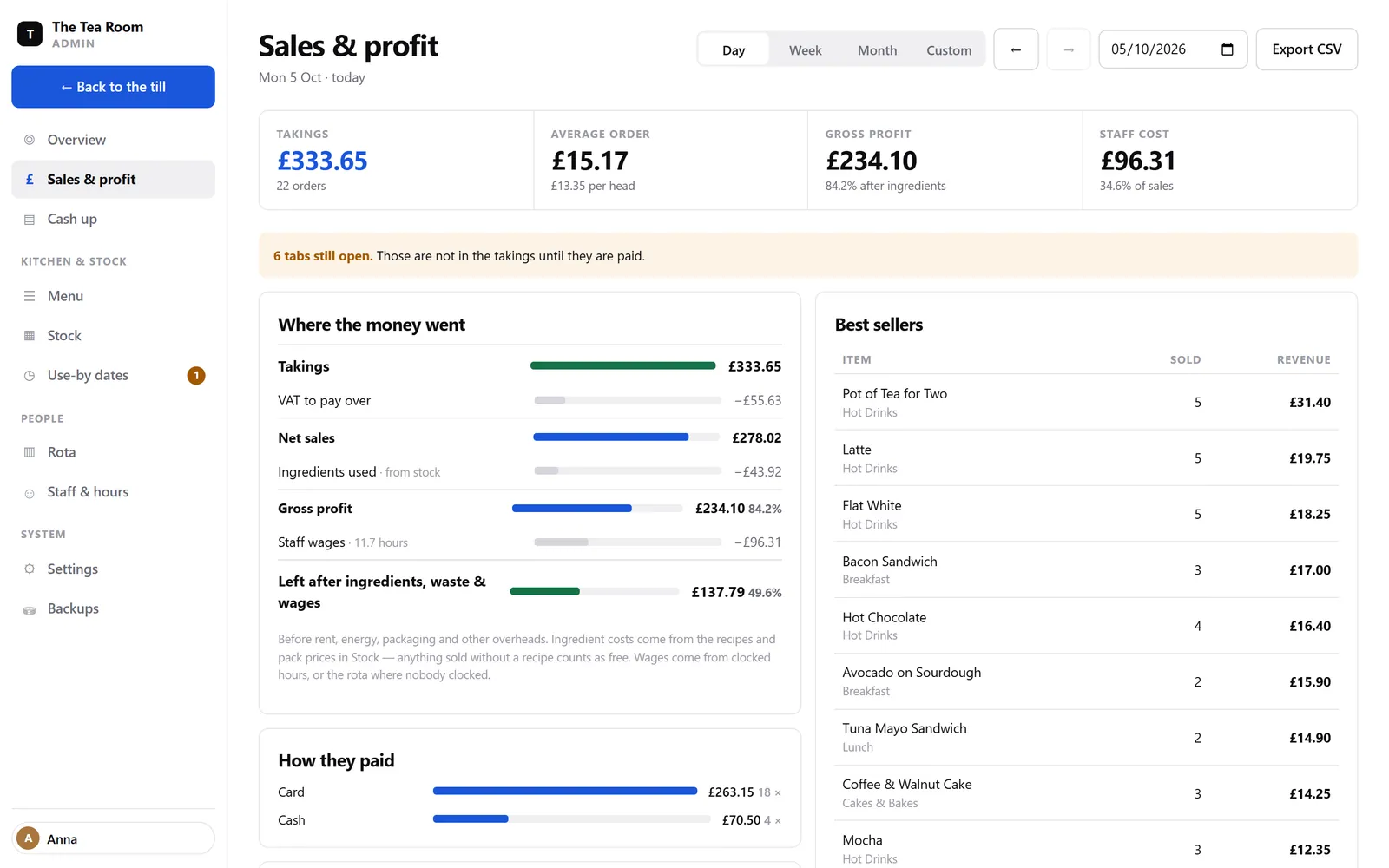
The Sales and profit screen, with a breakdown called 'Where the money went': takings, VAT, ingredients, gross profit, wages and what is left.
“Where the money went”: takings → VAT → ingredients → waste → wages → what's left.
  • Stock by the batch. Every sale comes out of the batch with the earliest use-by date (first expired, first out), and anything past its date can't be sold. The buttons badge themselves with “Sell first”, “3 left” and “Sold out”.
  • Manager sign-off without logging out. The manager enters their PIN on the same tablet. It authorises that one action only, and both names go in the log.
  • Receipts, kitchen tickets and date labels on any thermal printer. If the printer jams, the sale still goes through.
  • A rota that spots clashes. Staff clock in with a PIN, and their hours get checked against the rota.
  • Backups you can restore from, with a second copy kept somewhere else. If the till ever crashes, it restarts itself.

Try it · ring something up

A cut-down copy of the sell screen. It runs entirely in your browser, so nothing gets sent anywhere.

Park management · for a family-run group of holiday-home parks · built as a pitch

A pitch can only ever have one owner, and the database itself enforces it.

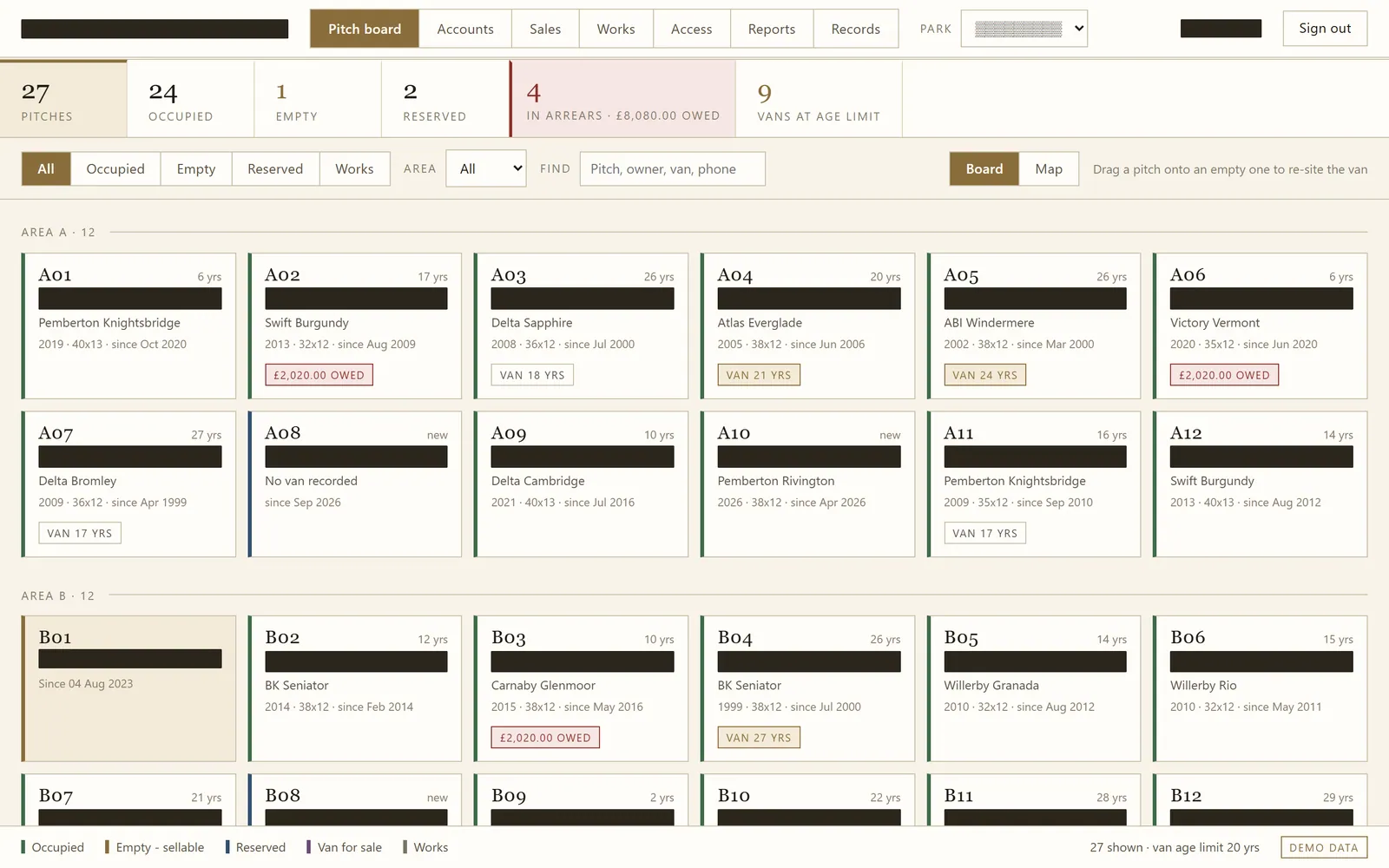
On these parks, people own their caravans and keep the same pitch for years, thirteen on average and thirty at the longest. So the main screen is a pitch board, showing who's on which pitch, what they owe and how old each van is. It also covers billing and arrears, caravan sales, repair jobs, the barriers and a public sales page.

Lines of code
23,400
Lines of tests
7,844
Checks
420
Processes racing, winners allowed
8 → 1
The pitch board: a grid of pitches labelled A01 to B12, each showing years held, the caravan model, and badges such as money owed or the van's age. Owner names are covered with black bars.
The pitch board. I've blacked out the owner names, even though they're made up.
  • The rules live in the database. Triggers and unique indexes make sure a pitch has one owner at a time and a fee, sale or repair can only be invoiced once.
  • Reports that check themselves against the accounts and go red if the numbers don't match.
  • A public sales page that can't leak. It's built from an allowlist of fields, so costs, profits and private notes can never reach it, and a test proves it.
  • Honest profit figures. A trade-in is valued at what it's really worth, regardless of the discount given against it, and it's never counted as cash.
  • Only one module can open a barrier, and it logs every card and number plate it sees.

Website & editor · for a tattoo and piercing studio

407 pieces on one wall, in black and white until you look closer.

A one-page website for a tattoo and piercing studio, plus an editor so they can run it themselves. It opens on their own work: 36 pieces in black and white, drifting slowly in six columns behind the logo and the booking buttons. Further down, all 407 pieces sit on one wall, and each one comes into colour when you point at it or open it. Apart from that drift, the only movement on the page is a gentle fade.

Lines of code
4,905
Pieces on the wall
407
Databases
0
Copies kept, for undo
40
The studio's home page, black and gold: tattoo photos in black and white fill the screen in tall columns behind the words 'Bring your dream to life', with 'dream' in gold italic, a line about the 407 pieces, and gold 'Book my tattoo' and 'See the work' buttons. Above them sit a gold Book button and a Menu button. The studio's logo and street are covered by bars.
The opening, with the wall of work drifting behind it. The studio's name is blacked out.
'Piercing prices' set like a menu in four columns, Ear, Face, Oral and Body, with a dotted line from each piercing to its price, such as lobe £25, septum £35, lip £30 and navel £30, and the price for a pair in small type underneath. The piercer's name and photo are covered.
The piercing prices, set like a menu.
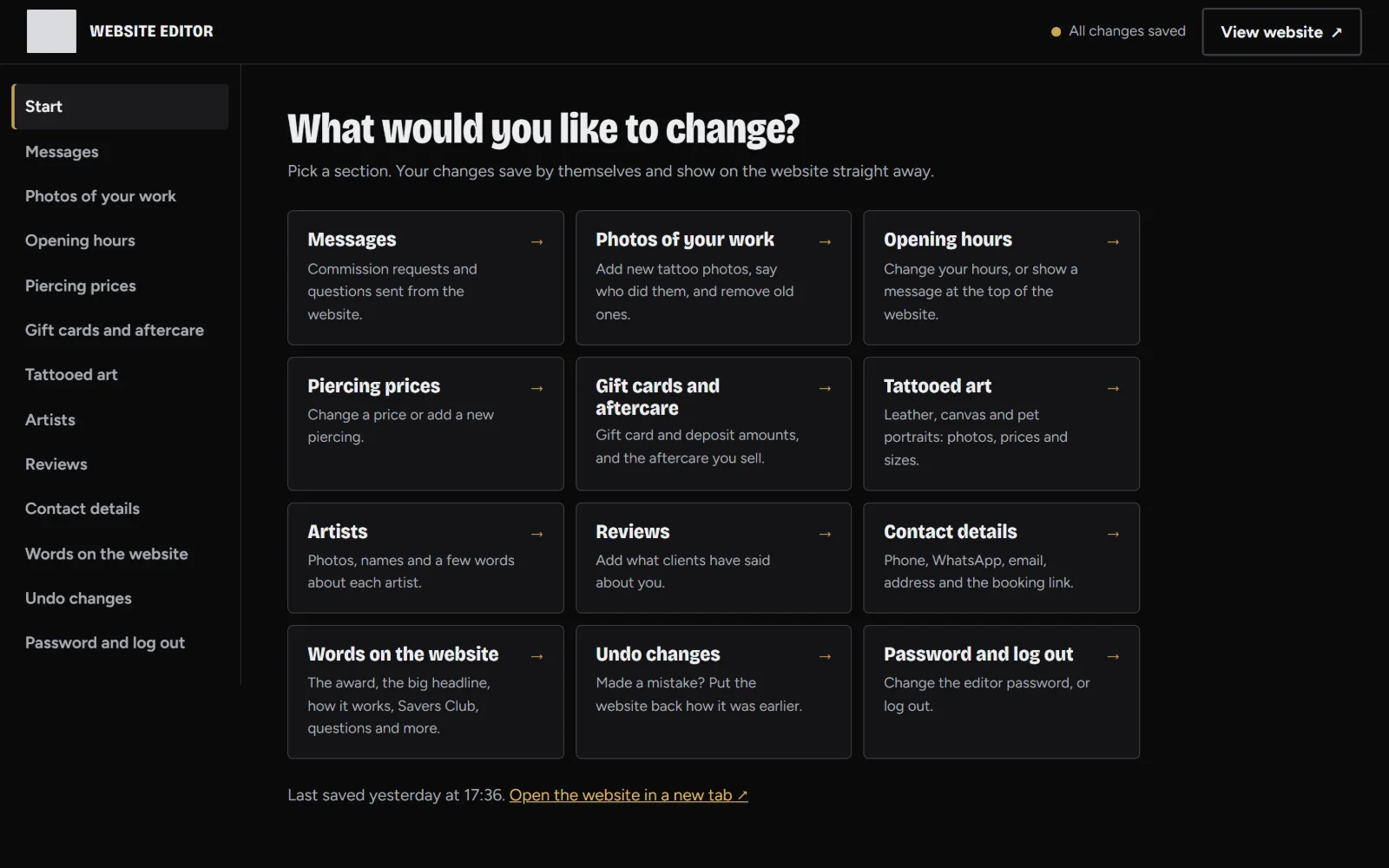
The website editor's start page: 'What would you like to change?' above twelve large buttons such as Messages, Photos of your work, Opening hours, Piercing prices and Undo changes.
The editor: “What would you like to change?”
  • The wall. All 407 pieces, newest first. Pick an artist or a style, such as cover-ups, to narrow it down. Pick the Colour style and those pieces show in full colour straight away.
  • Their best work up front. Star a photo in the editor and it goes into the drifting wall at the top of the page, ahead of the rest.
  • Booking goes straight to the artist. Each artist has a “Book with…” button that opens their own booking page.
  • Messages land in the editor. Commission requests and questions from the website wait there with a reply button, and the start page shows how many are new.
  • An editor anyone can use. Changes save themselves within a second, and one click rolls the whole site back to how it was.
  • Two people editing at once? The second save is refused with a message explaining why, so nobody overwrites anyone else's work.
  • Locked down. The password is hashed, five wrong attempts lock the editor for ten minutes, every change carries a CSRF token, and uploads are checked to be genuine image files. The website's forms quietly drop robot posts and take five messages an hour from one address at most.
  • It respects “reduce motion”. With it switched on, the wall stands still and nothing moves by itself.

Online shop · for a tattoo supplies brand · built as a pitch

Every cartridge, seen from the tip at its true size.

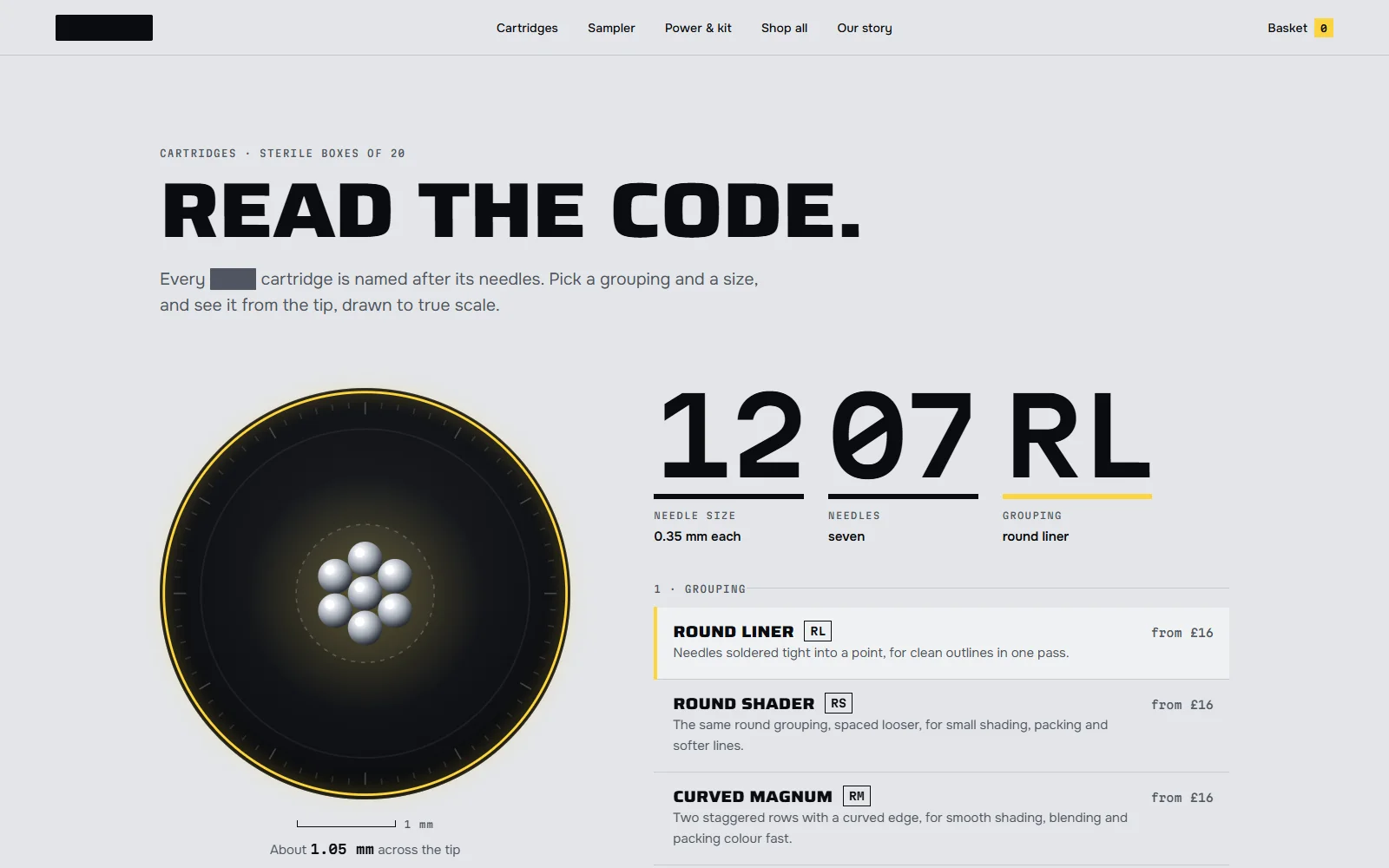
A new online shop for a supplies brand that started out in a working tattoo studio. Every needle cartridge has a code. 1207RL, for example, means seven size 12 needles in a round liner. So I drew every code end-on, at its real size, as points of light, and that drawing is used everywhere: the opening, the size picker, the product pictures, the basket and even the favicon.

Lines of code
2,760
Cartridge codes, drawn to true scale
24
Products
10
Databases
0
The shop's home page, black with a honeycomb pattern: 'Precision. Performance. Perfected.' in heavy capitals, the last word in yellow, and a yellow 'Try 10 cartridges for £10' button. On the right, a yellow ring frames seven silver needle tips seen end-on. The brand's name, logo, town and studio are covered by bars.
The opening, looking straight down a seven-needle liner. The brand's name is blacked out.
'Read the code': a large dial shows seven needle tips at true size with a 1 mm scale bar, beside the code 12 07 RL broken into needle size 0.35 mm, seven needles and round liner, and a list of groupings such as round liner, round shader and curved magnum, each from £16.
Pick a grouping and a size, and you see it at its real size.
'Try ten. For a tenner.': a photo of ten sealed needle cartridges in two rows, each with a small round marker, beside a list of the ten codes from 0803RL to 1015RM with their needle counts and sizes.
The £10 sampler, with a marker on each cartridge in the actual photo.
  • The opening. You start by looking straight down a liner. As you scroll, the needles fan out into a ring light, the lights come on one at a time, and the glow spreads until the whole page is lit. Even if you flick past quickly it takes about a second, so it never flashes at you.
  • No boxes round the photos. The page is the exact same grey as the background of their product photos, so every product looks like it was shot right there on the page.
  • Nothing breaks in the move. Every link from the old shop still works, so anyone arriving from Google lands on the right page.
  • It respects “reduce motion”. The opening becomes a still page, and nothing moves on its own.

Website · for Coastal Dream Radio, community radio on the Lincolnshire coast

The sea moves to whatever's on air.

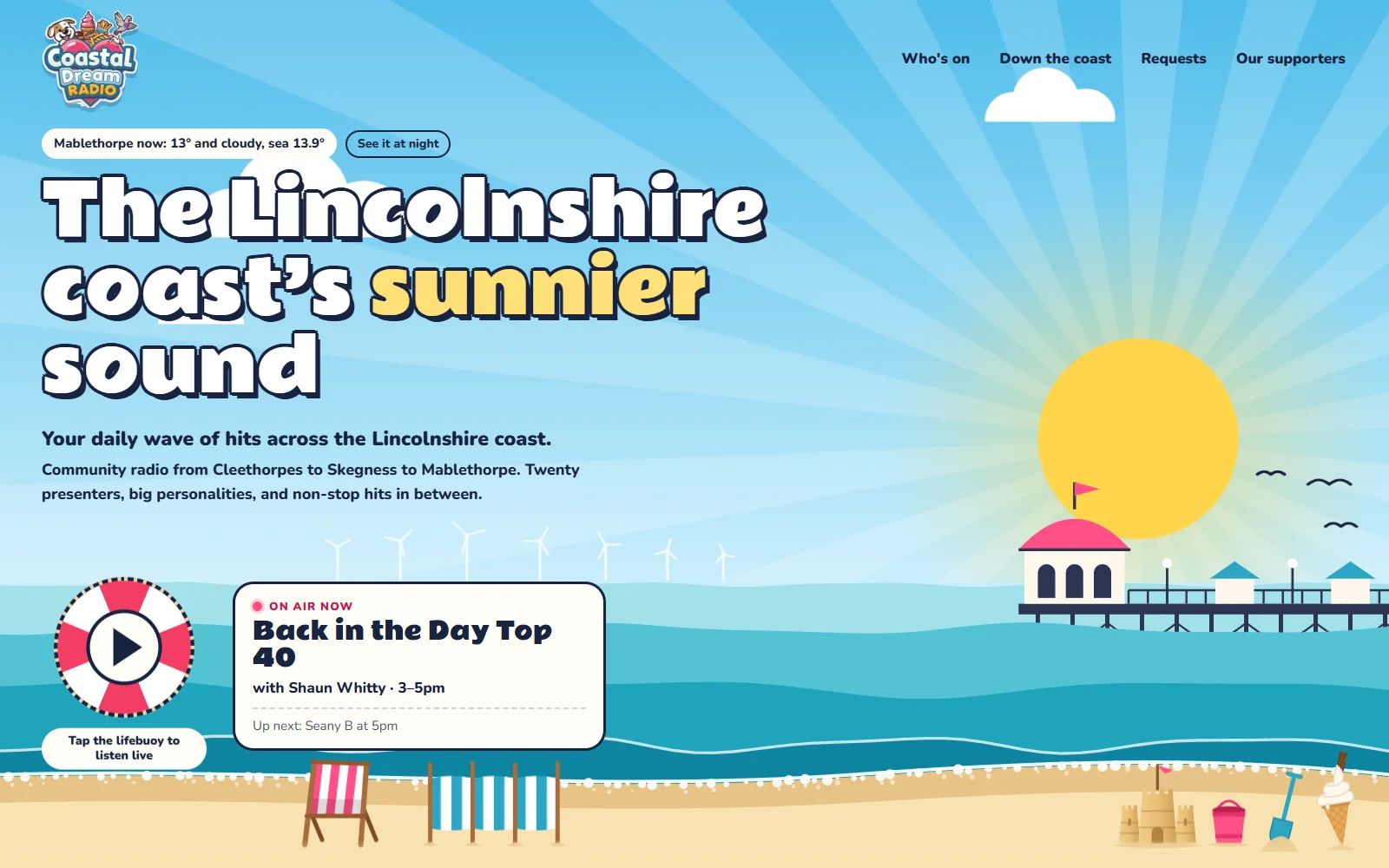
Coastal Dream's tagline is “your daily wave of hits”, so I made the sea the radio. Tap the lifebuoy floating in it and the live stream starts. Then the waves move to the music: the bass lifts the big swell at the back and the high notes ripple the little waves at the front. It's read from the actual audio as it plays, so no two songs look the same.

Lines of code
2,113
Bands of sea moving to the music
4
Presenters, each with a beach hut
20
Stops down the coast
9
Coastal Dream Radio's home page drawn like an old seaside poster: their logo, then 'The Lincolnshire coast's sunnier sound' in chunky white letters over a sunburst sky, a pier with a pink domed pavilion, wind turbines out at sea, and a red and white lifebuoy with a play button floating in the waves beside an 'On air now' card for Back in the Day Top 40 with Shaun Whitty. Deckchairs, a sandcastle, a bucket and spade and a 99 on the beach.
The opening. Tap the lifebuoy and the sea starts moving to the live stream.
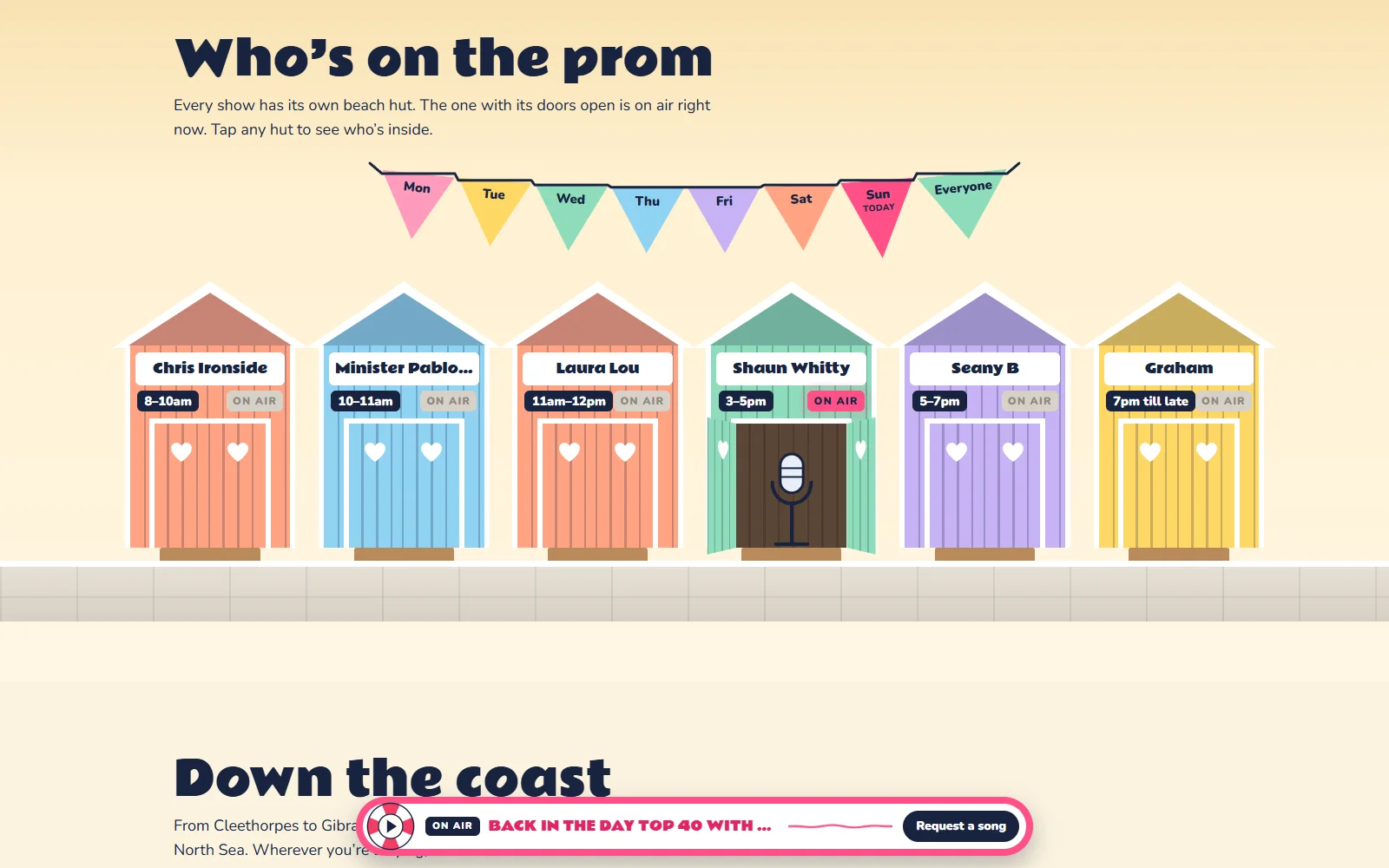
'Who's on the prom': Sunday's six pastel beach huts in a row under a string of bunting with a flag for each day, each with the presenter's name on the fascia and the show time on a plate. Shaun Whitty's hut has its On Air lamp lit and its doors open, with a microphone standing inside.
The schedule as a row of beach huts. The one that's on air has its doors open.
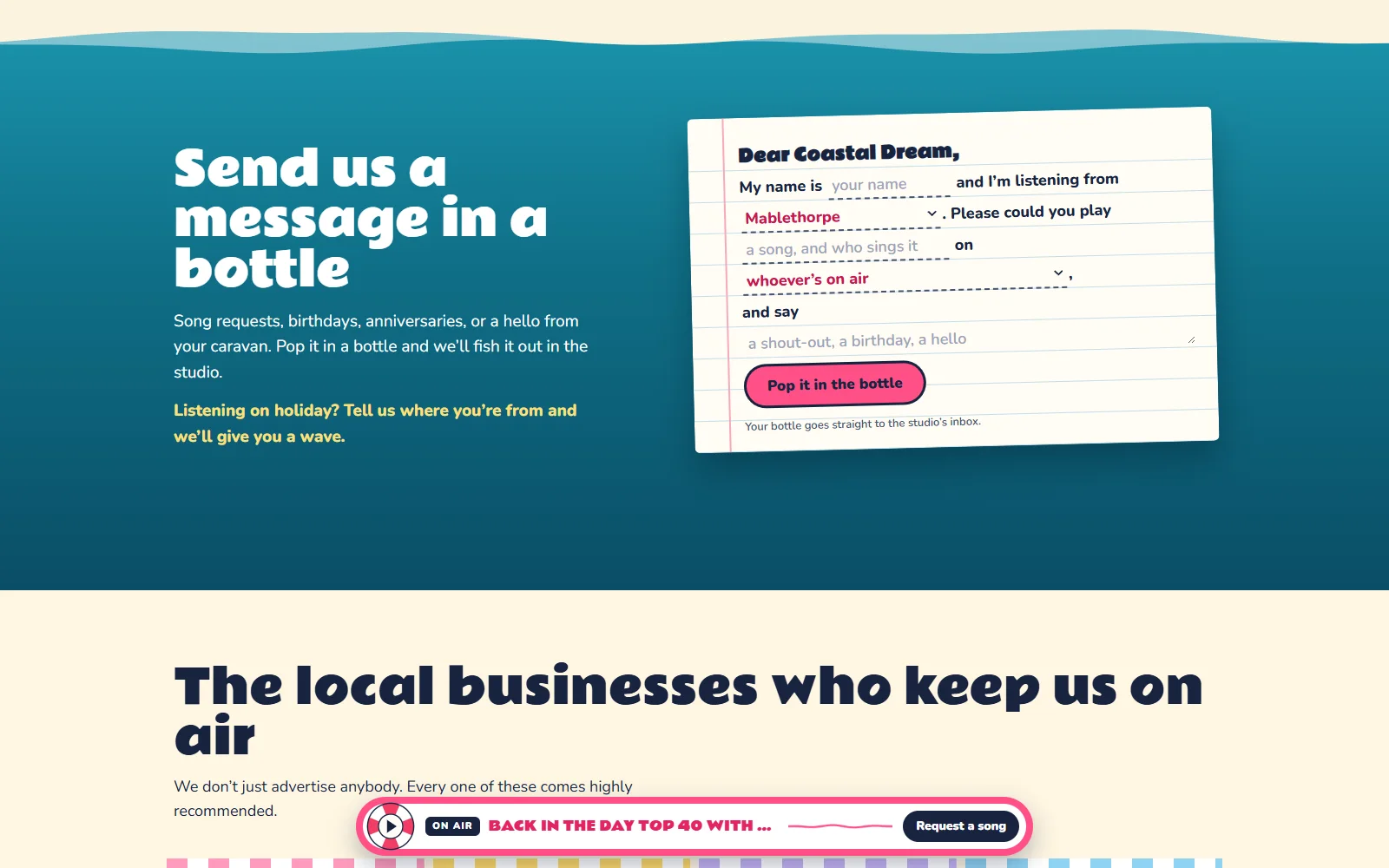
'Send us a message in a bottle': a request form written as a letter on lined paper, starting 'Dear Coastal Dream,', with blanks for your name, your town, a song and the show, and a pink 'Pop it in the bottle' button.
Requests are a letter that rolls up into a bottle and floats off to the studio.
  • The sky is the real sky. It follows the time on the coast, with sunrise and sunset from a weather service. It's blue by day, golden late in the afternoon and pink at dusk, and at night there are stars and the lights come on along the pier.
  • “On air” is really on air. The show's name comes straight from the stream, checked every 30 seconds, and the right presenter's hut opens its doors.
  • Down the coast. A holiday map from Cleethorpes to Gibraltar Point, with the live air and sea temperature, the waves, the wind and tonight's sunset.
  • It respects “reduce motion”. The sea stays still until you press play.

Website & editor · for a family kitchen maker

Workshop videos, minus the workshop radio.

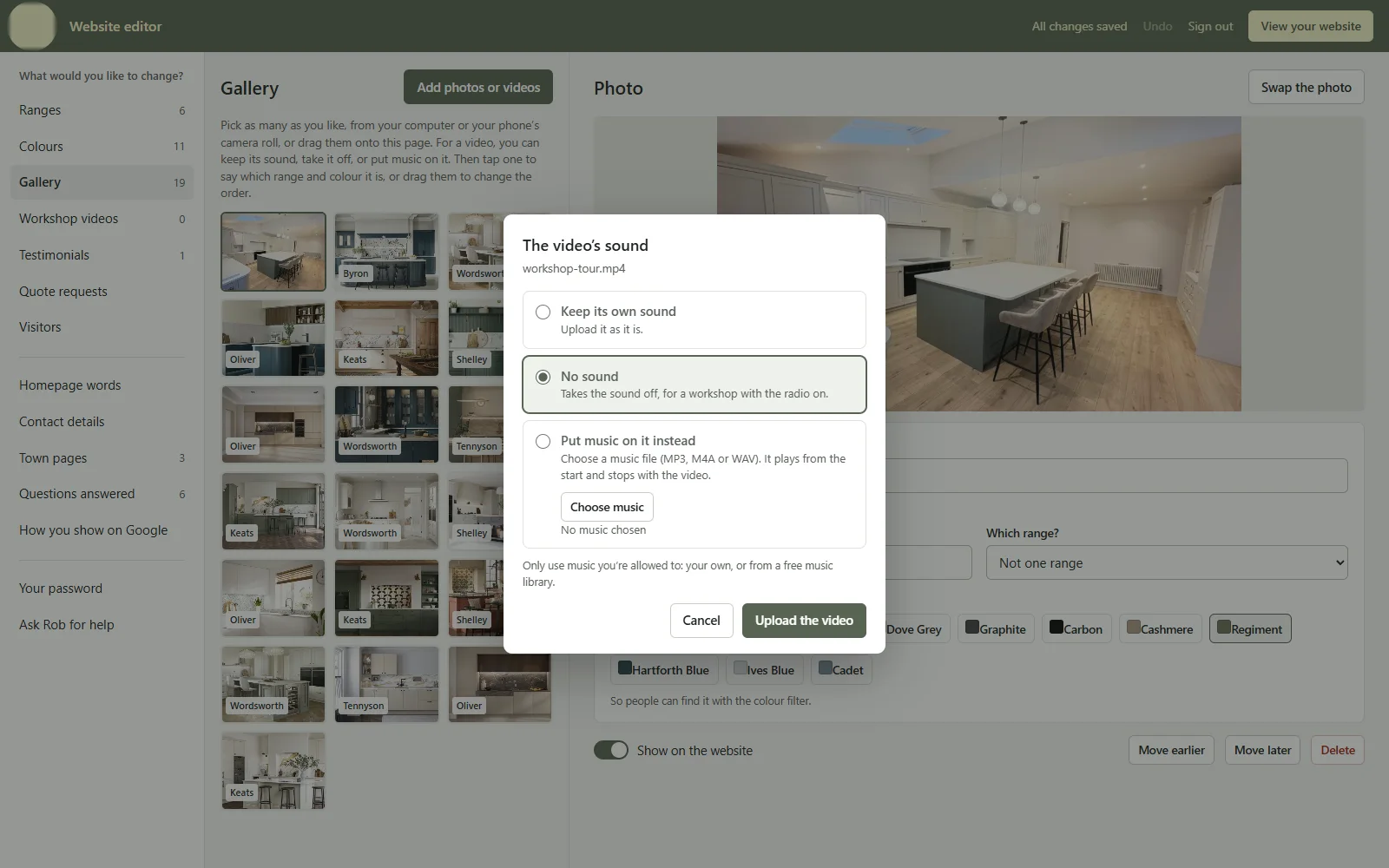
They make solid wood kitchens by hand in their own workshop, then deliver and fit them anywhere in the UK. Their old Wix site already looked the part, so I kept its look and rebuilt everything underneath it. They film a lot in the workshop, usually with the radio on, so before a video goes up the editor asks what to do with its sound: keep it, take it off, or put music on it. That happens in their own browser, before anything is uploaded.

Lines of code
4,476
Pages, built on the server for Google
18
Kitchen ranges, each with its own page
6
Colours to filter the gallery by
11
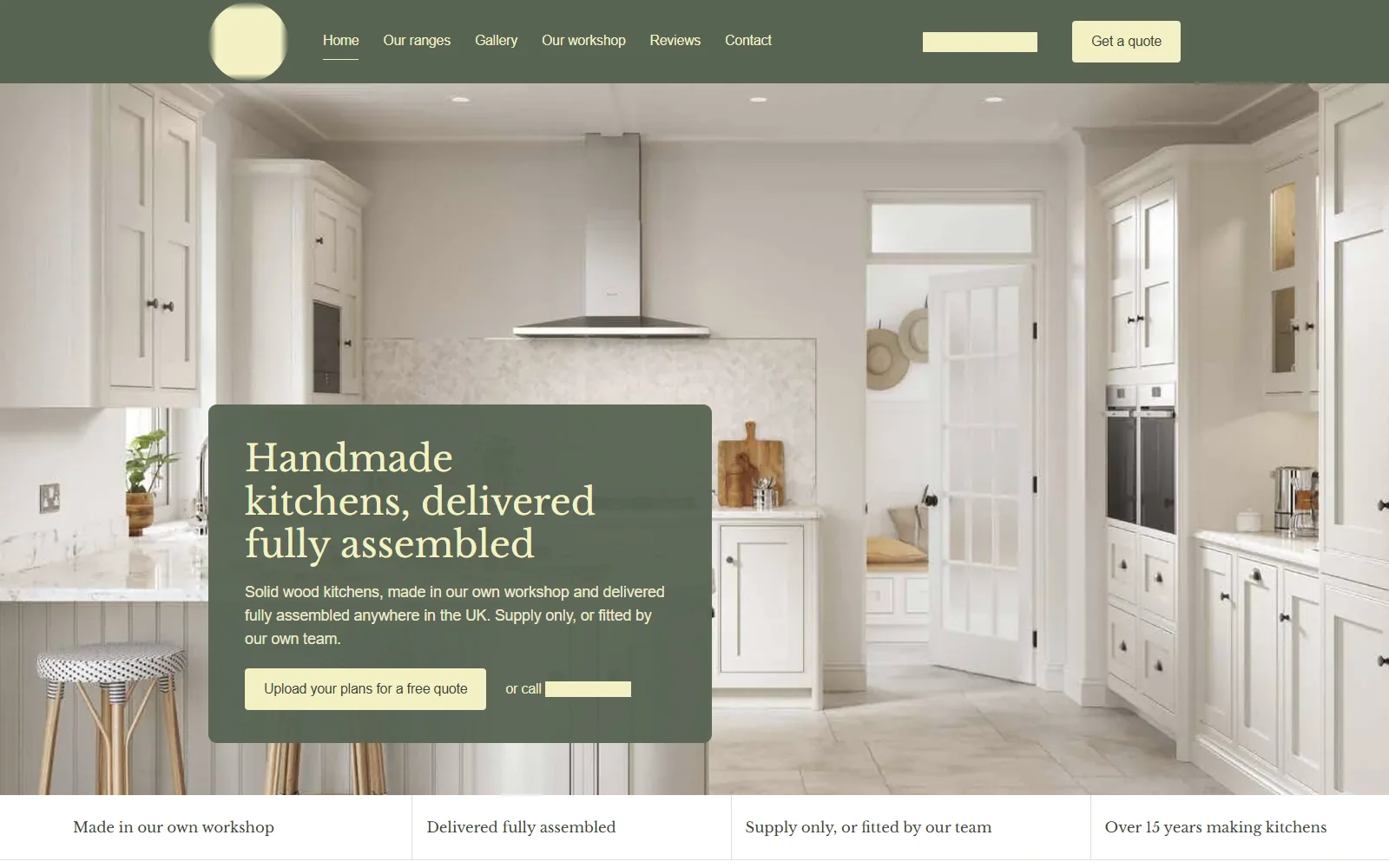
The kitchen maker's home page: a dark green bar with the logo and menu, then a big photo of a cream shaker kitchen with a green panel over it saying 'Handmade kitchens, delivered fully assembled' and a button to upload your plans for a free quote. Along the bottom: made in our own workshop, delivered fully assembled, supply only or fitted by our team, over 15 years making kitchens. The logo and phone number are barred.
The home page, in the green from their logo. Their name and number are barred here.
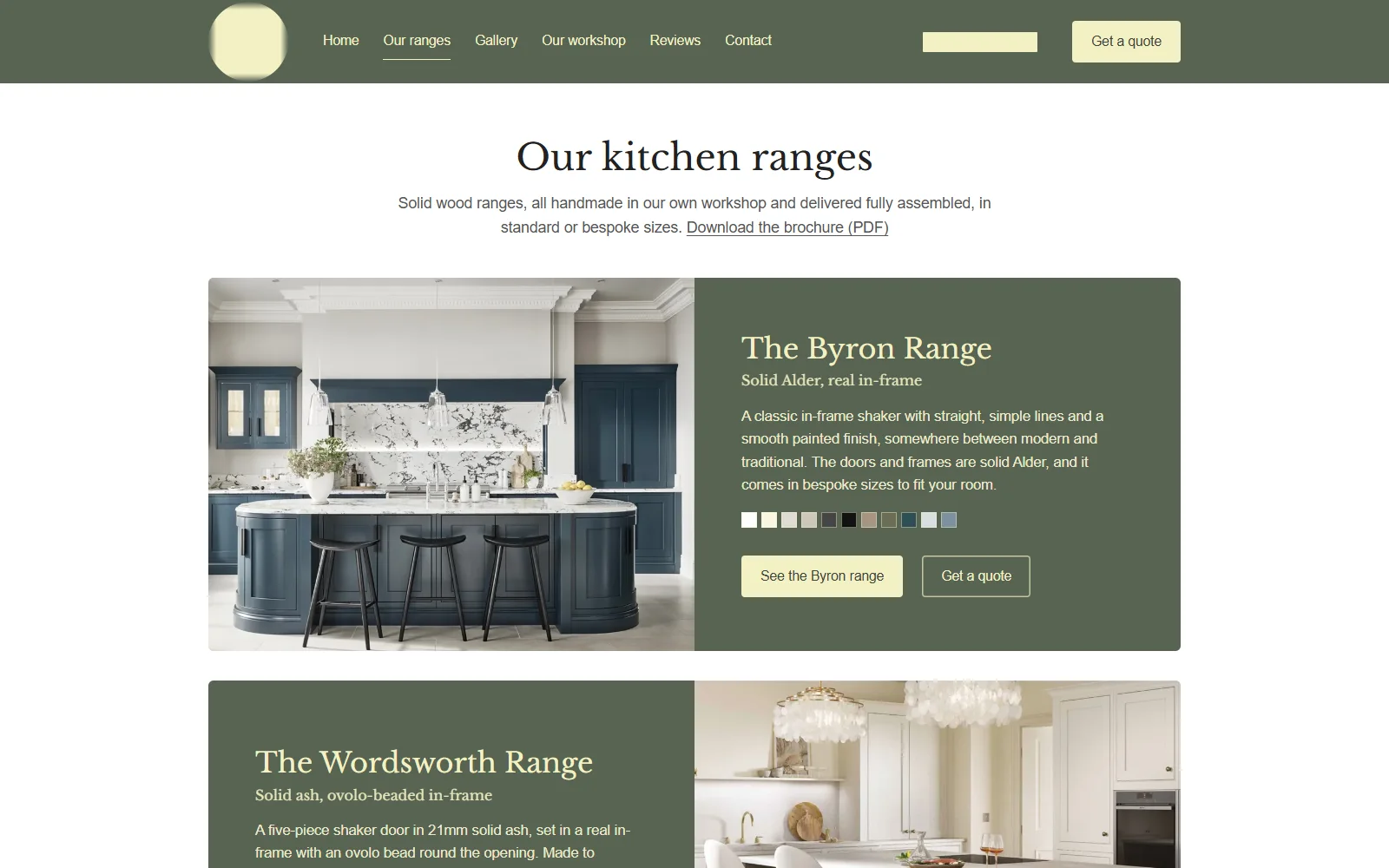
'Our kitchen ranges': The Byron Range beside a photo of a navy island kitchen, described as solid alder in a real in-frame, with a row of small colour swatches and buttons to see the range or get a quote. The Wordsworth Range starts below it.
Each range with its colours. The same words and photos make their printed brochure.
The website editor: a menu down the left (ranges, colours, gallery, workshop videos, testimonials, quote requests, visitors and more) and a grid of gallery photos, each tagged with its range. Over it, a box asks what to do with a video's sound before it goes up: keep its own sound, no sound (ticked, 'for a workshop with the radio on'), or put music on it instead.
Before a video goes up, the editor asks what to do with its sound.
  • Built on the server, for Google. Every page arrives ready to read, with the business details search engines look for, a sitemap of every photo and video, and a page for each town near the workshop.
  • Nothing lost in the move. Every old Wix address sends people, and Google, on to its new page, so old links and search history carry across.
  • Quotes with plans. The quote form takes drawings and photos of the room. They're emailed to the workshop and kept in the editor as well, big files included.
  • Photos straight from a phone. The editor makes them smaller before they go up, so the site stays quick on one bar of signal.
  • Visitors, counted without cookies. The editor shows how many people came and what they looked at. It's counted on the website's own server, so there's no cookie banner to click.

MobelSuite · retail software for furniture shops · in daily use · not on sale yet

Software that knows what a cover grade is.

Everything a furniture shop needs, from the first enquiry through to delivery, plus the website. A real shop runs on it every day. It isn't on sale yet, so this is one small piece of it.

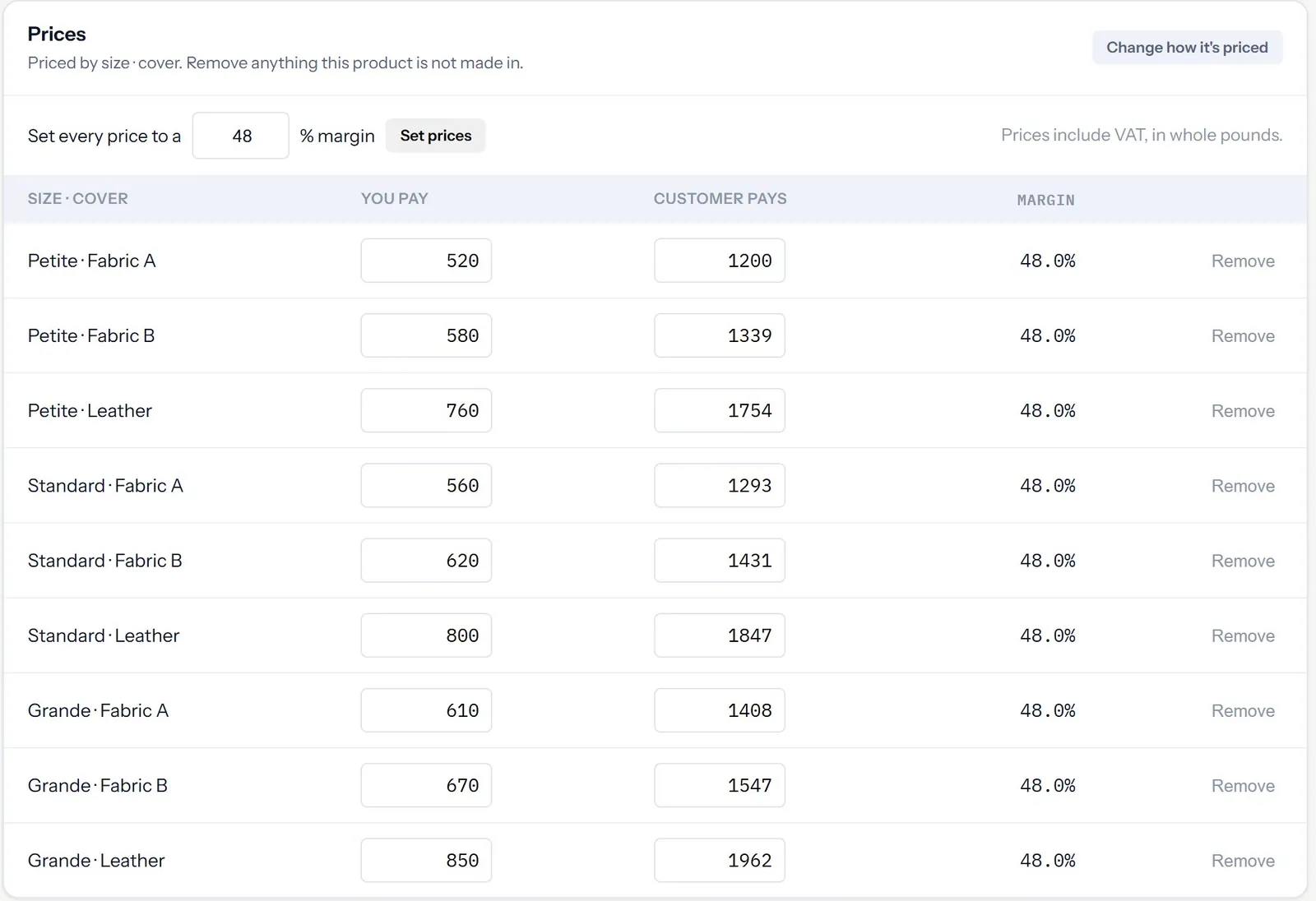
A price grid for a riser recliner: nine rows of size and cover, each with what the shop pays, what the customer pays in whole pounds, and a 48% margin.
One price for each size and cover, laid out the way the supplier prints it. (Demo data.)

Try it · the whole-pound rule

The margin is worked out on the price before VAT, because the VAT was never the shop's money. Then the price rounds up to the next whole pound, so nothing ever sells for less than the margin you asked for.

VAT
 
 supplier --> find --> score --> price
                                   |
   shop <-- publish <-- rules <----'
                          |
              rejected <--+
         decisions.log <--'

Shop engine · 6,300 lines · 103 checks

Bargain Bin

A shop that stocks itself. It finds products from a wholesale supplier, prices them to hit a set margin, checks them against safety rules and puts them live. It writes down why it made every decision, and if the supplier's feed breaks, the live shop isn't affected. Saving used to get slower as the catalogue grew, up to an hour for 5,000 products. Now it's a steady 0.78 ms each.

Game · for a Year 9 student just starting Python

Python, taught by a dungeon.

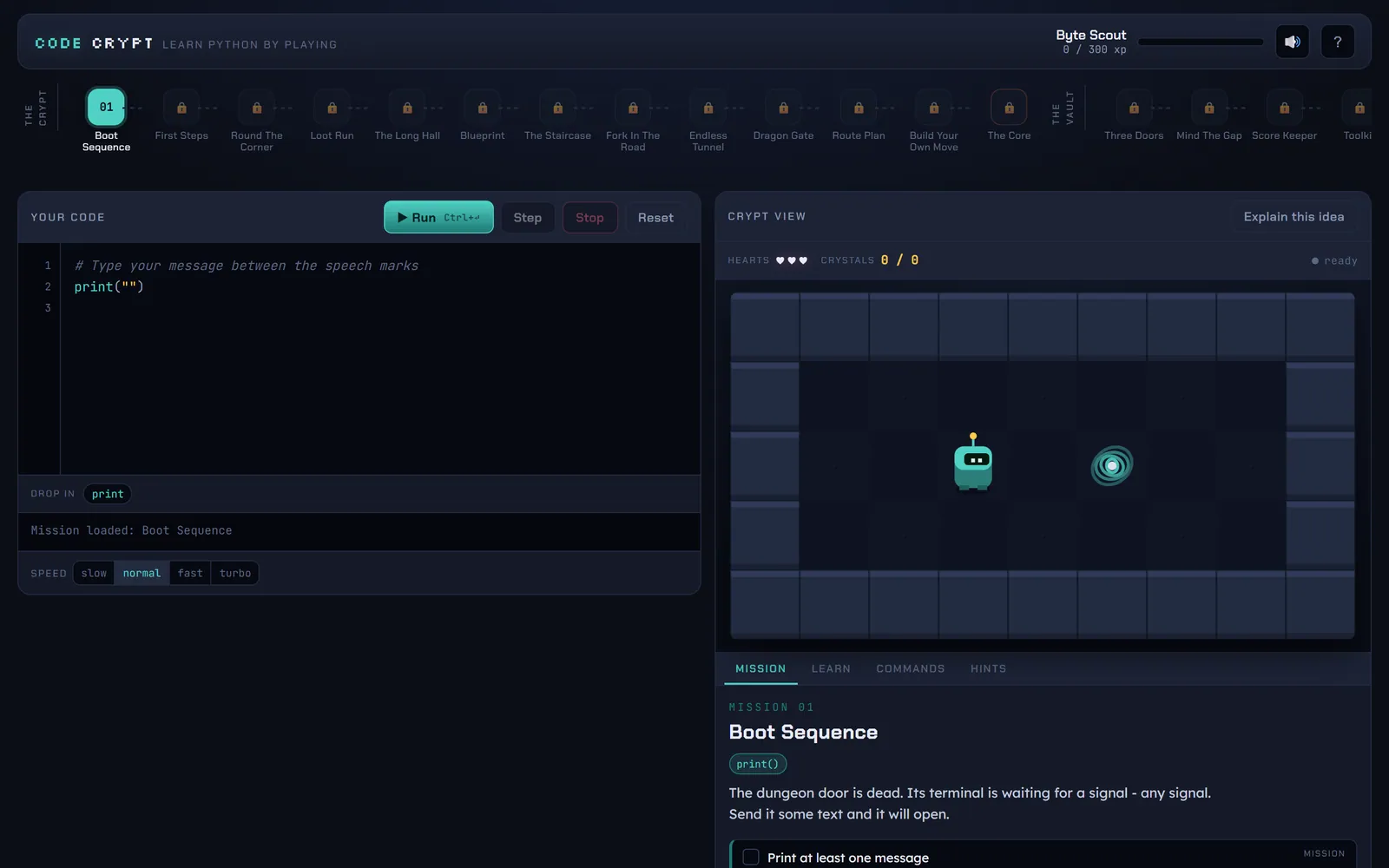
The only way to play is to write code. You type Python and the hero moves, picks up crystals, opens doors and heads for the portal. It runs in the browser on a Python interpreter I wrote from scratch in JavaScript. It steps through your code a line at a time, and the error messages are written for a fourteen-year-old who's new to coding.

Missions
23
Lines in the interpreter
1,564
Interpreter tests
185
Badges to earn
16
Code Crypt: a row of missions along the top, a code editor on the left, and a dungeon on the right with a small robot and a glowing portal.
Mission one: make the computer talk.

Snippets · mission 10 and the game's own error messages, word for word

Dragon Gate Hatchlings are sleeping in the corridor, in different spots every run. Walk into one and it bites. Hit it first and it does not.
while not at_goal():
    if monster_near():
        attack()
    else:
        move_right()
  • To compare two things use == (two equals signs), not =.

    One = means "store this value". Two == means "are these the same?".

  • I do not know anything called move_rigt.

    Did you mean move_right?

  • move_right on its own does not do anything.

    Add brackets to actually run it: move_right()

  • You have walked into the same wall 15 times in a row.

    Your loop is running, but the hero is stuck. Something inside it needs to change direction.

  • Step through slowly. The line that's running lights up and every move is animated. There are four speeds and a stop button.
  • Errors in plain English. A typo (“Did you mean move_right?”), a missing colon, a missing indent, or = where it should be ==. Each one gets its own help.
  • The maps are randomised every run, so you can't memorise the answer.
  • A level checker plays through every mission to prove it can be completed. It caught three broken maps before any player did.

Browser game · for a 13-year-old learning Python at school

Every spell is real Python.

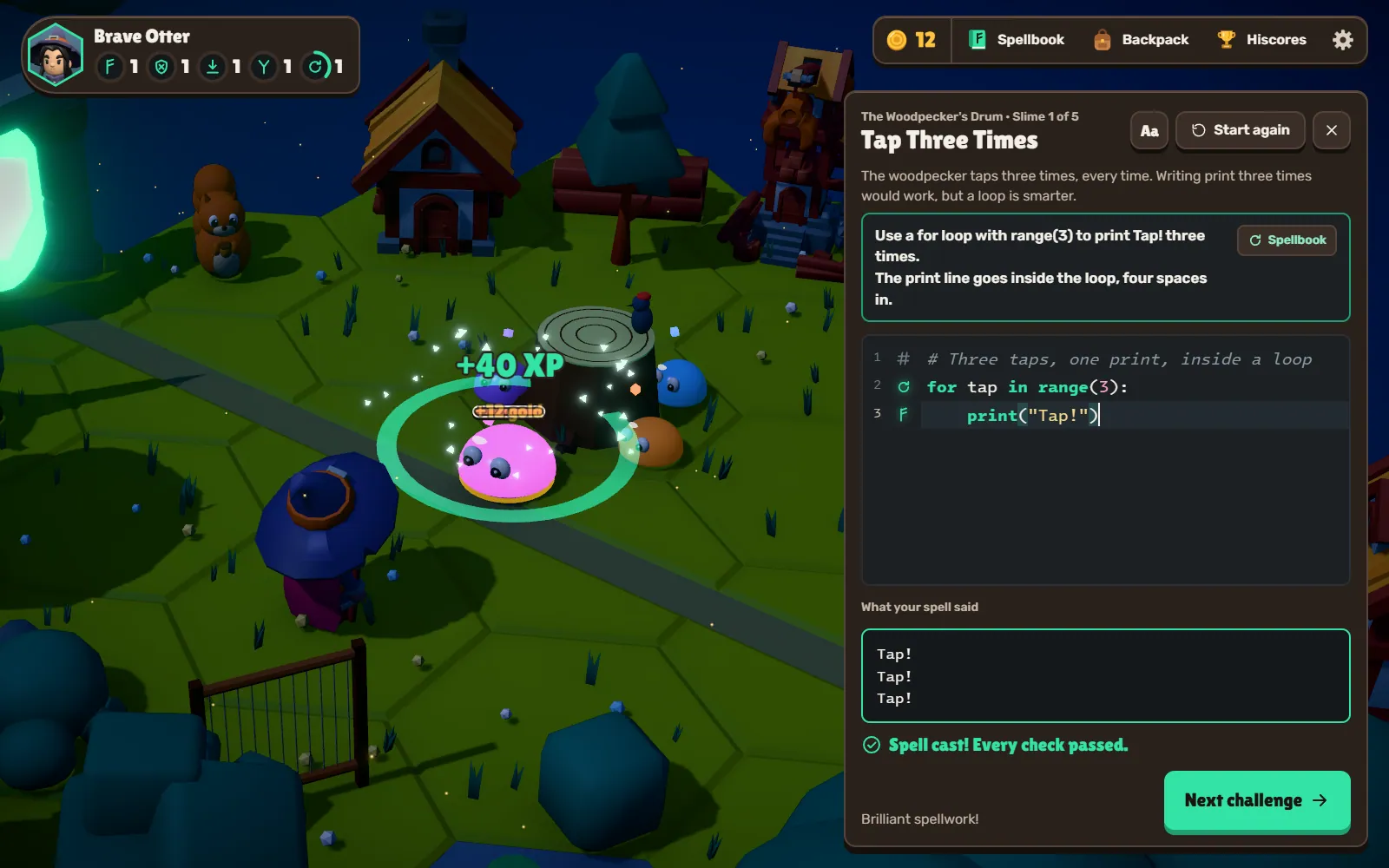
A 3D role-playing game where your only weapon is code. You make your way across a chain of floating islands, and every Glitch Slime in your way is a challenge. Write the spell on the Spell Slate, cast it, and if it passes every check, it hits. And it's real Python, the standard interpreter compiled to WebAssembly (Pyodide), so everything you learn carries straight over to school.

Lines of code
18,524
Challenges, one slime each
75
Wrong answers it proves are refused
136
Islands so far
4
A night-time forest island in blocky 3D: a pink slime pops in a ring of green light under '+40 XP'. Beside it, the Spell Slate holds a three-line for loop, the words Tap! three times under 'What your spell said', and 'Spell cast! Every check passed.'
A for loop, cast in the Looping Woods. Three taps, one slime popped.
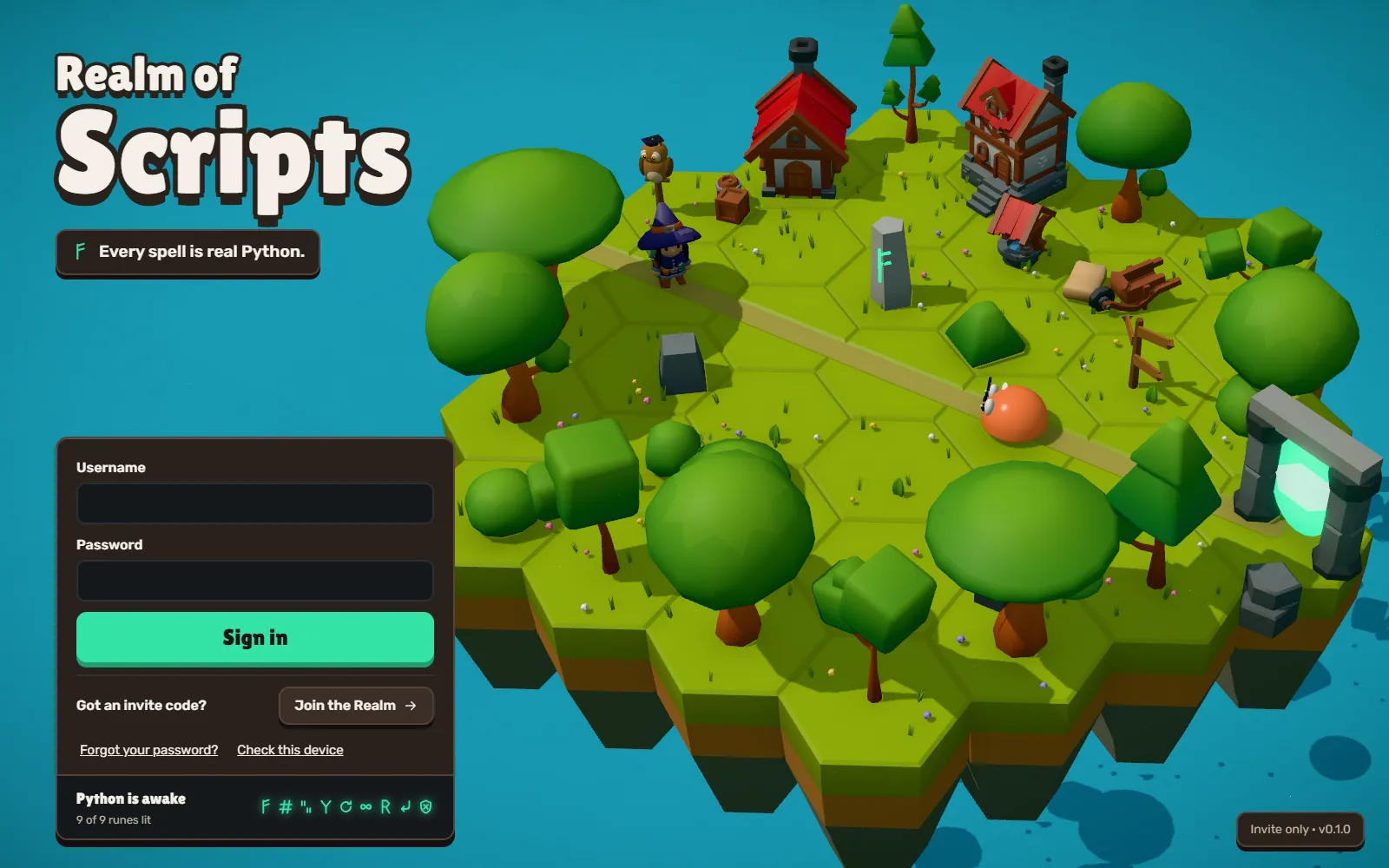
The title screen: 'Realm of Scripts' in chunky letters over 'Every spell is real Python', a sign-in box with a Join the Realm button for invite codes, and a floating island of grass hexes with cottages, trees, a rune stone and a glowing portal.
The front door. No invite code, no way in.
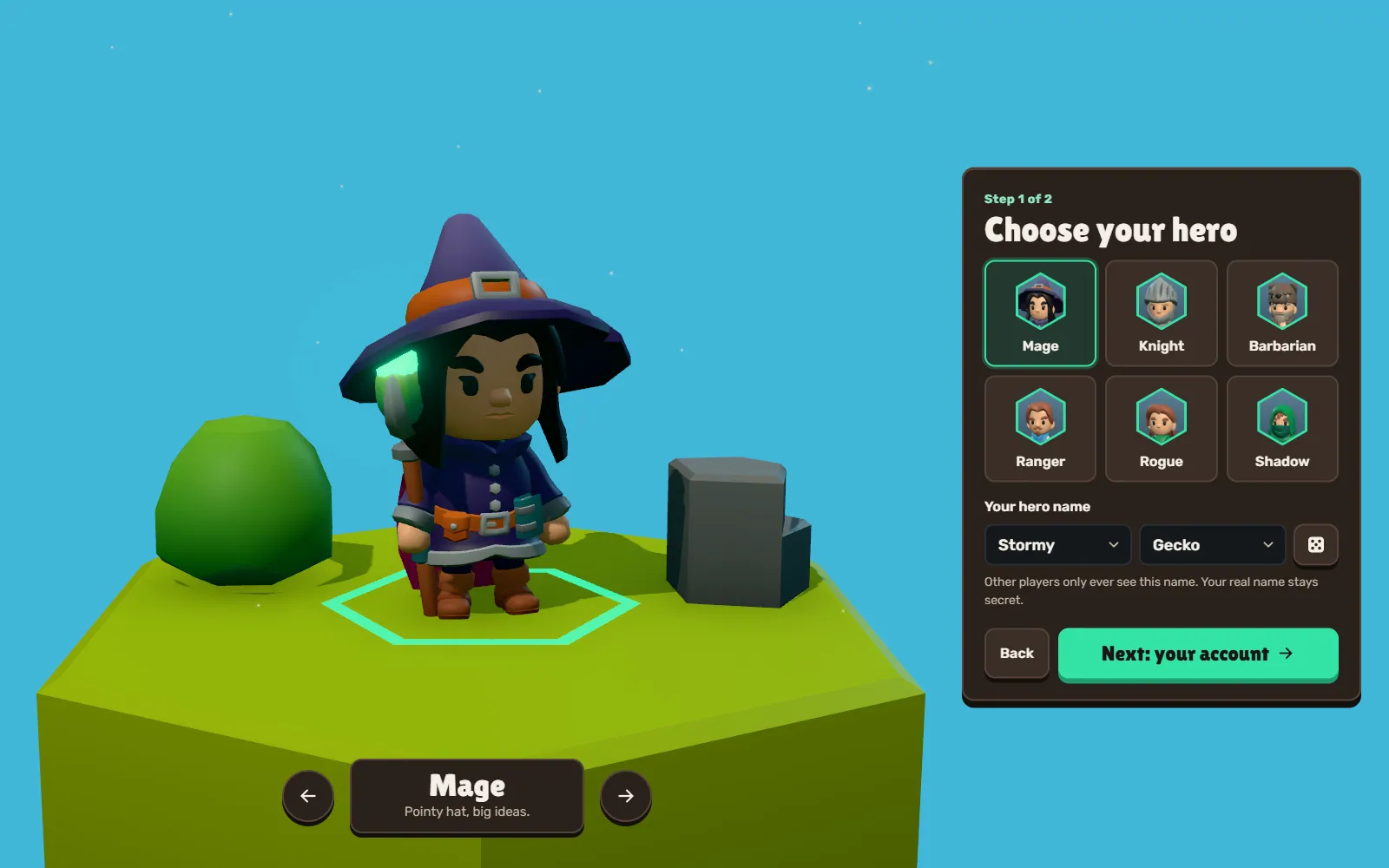
Choosing a hero: a low-poly mage in a purple hat stands on a grass tile beside six heroes to pick from, and a hero name made of two words picked from lists, here Stormy Gecko.
Hero names are picked from two word lists, so nobody can type anything rude.

Snippet · one challenge, word for word from its content file (trimmed), and what the checker proves about it

Tap Three Times The woodpecker taps three times, every time. Writing print three times would work, but a loop is smarter.
solution: |
  for tap in range(3):
      print("Tap!")
wrong_answers:
  - code: |
      print("Tap!")
      print("Tap!")
      print("Tap!")
    expect: missing:For
  - code: |
      for tap in range(4):
          print("Tap!")
    expect: line_count
  - code: |
      for tap in range(3):
      print("Tap!")
    expect: IndentationError
tests:
  - kind: ast
    require: [For, "call:range"]
  • The answer passes.

    Its output must match, and it must really use a for loop with range().

  • The starting code fails.

    Casting a blank slate never pops a slime.

  • Three prints in a row: refused.

    The right words, but no loop.

  • range(4): refused.

    One tap too many.

  • The print not indented: refused.

    An IndentationError, with the fix in plain words.

  • Nothing it hasn't taught yet.

    The answer only uses Python from this island and the ones before it.

  • Code is the combat. Every spell flies off as a bolt carrying whatever your code printed. Get it wrong and it fizzles out, and it tells you what went wrong.
  • Help when you're stuck. A free nudge, a hint token for a reminder, or a full walkthrough for a quarter less XP.
  • Every island has its own look: a spring morning, a violet twilight, an autumn sunset, a moonlit forest with fireflies.
  • Hiscores are worked out on the server from what each player has completed, so nobody can fake their way up the table.
  • Fancy or Fast graphics, picked for each device, so it runs on an iPad as well as a desktop PC.

RuneLite plugin · for Old School RuneScape players

A coach that can see your bank.

A sidebar in RuneLite (the client most people play on) where you can ask an AI coach what to do next. It looks at your live stats, quests, items, bank and Grand Exchange offers, checks the official wiki and live prices, then gives you real numbers, like XP an hour, gold an hour and how long until you hit your goal. It only gives advice. It never plays the game for you.

Lines of Java
3,962
Game tools it can use
7
Tests, all passing
14
  • I wrote the connection to the AI from scratch on RuneLite's own web and JSON libraries, because plugins aren't allowed to bring in their own.
  • The maths is done in code. XP and time to goal are calculated exactly, up to level 126, so the AI never has to guess a number.
  • It only looks things up on the official wiki, so the advice keeps up with game updates.
  • It knows if you're an Ironman, so it'll never tell you to go and buy something.
  • Every answer shows what it cost, and you choose which model it uses and how hard it thinks.

On the left is a mock-up of how an answer comes in, with the steps it shows you while it's working. It's not a real session.

Easter egg · a secret page for a furniture shop's website

The No button runs away.

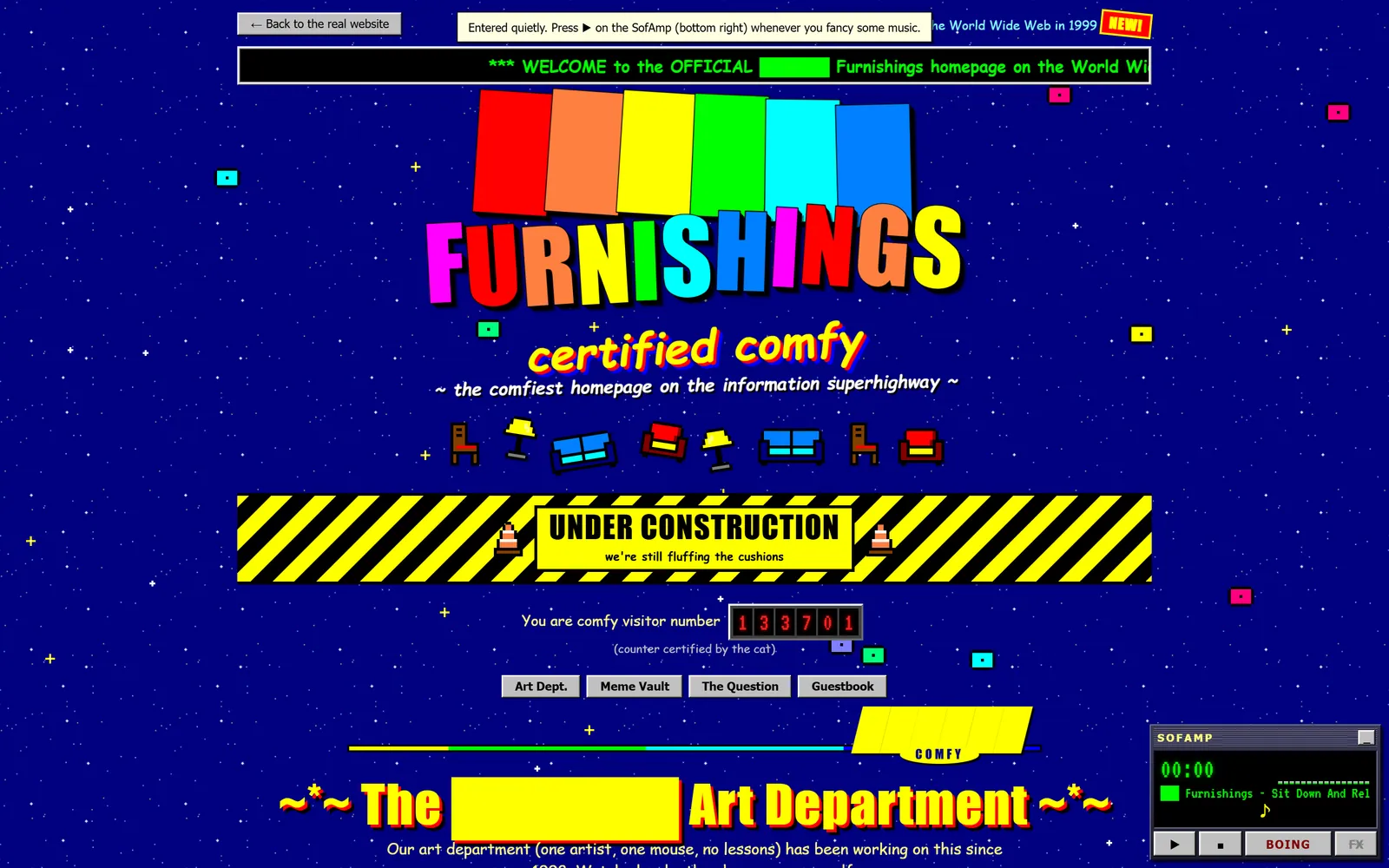
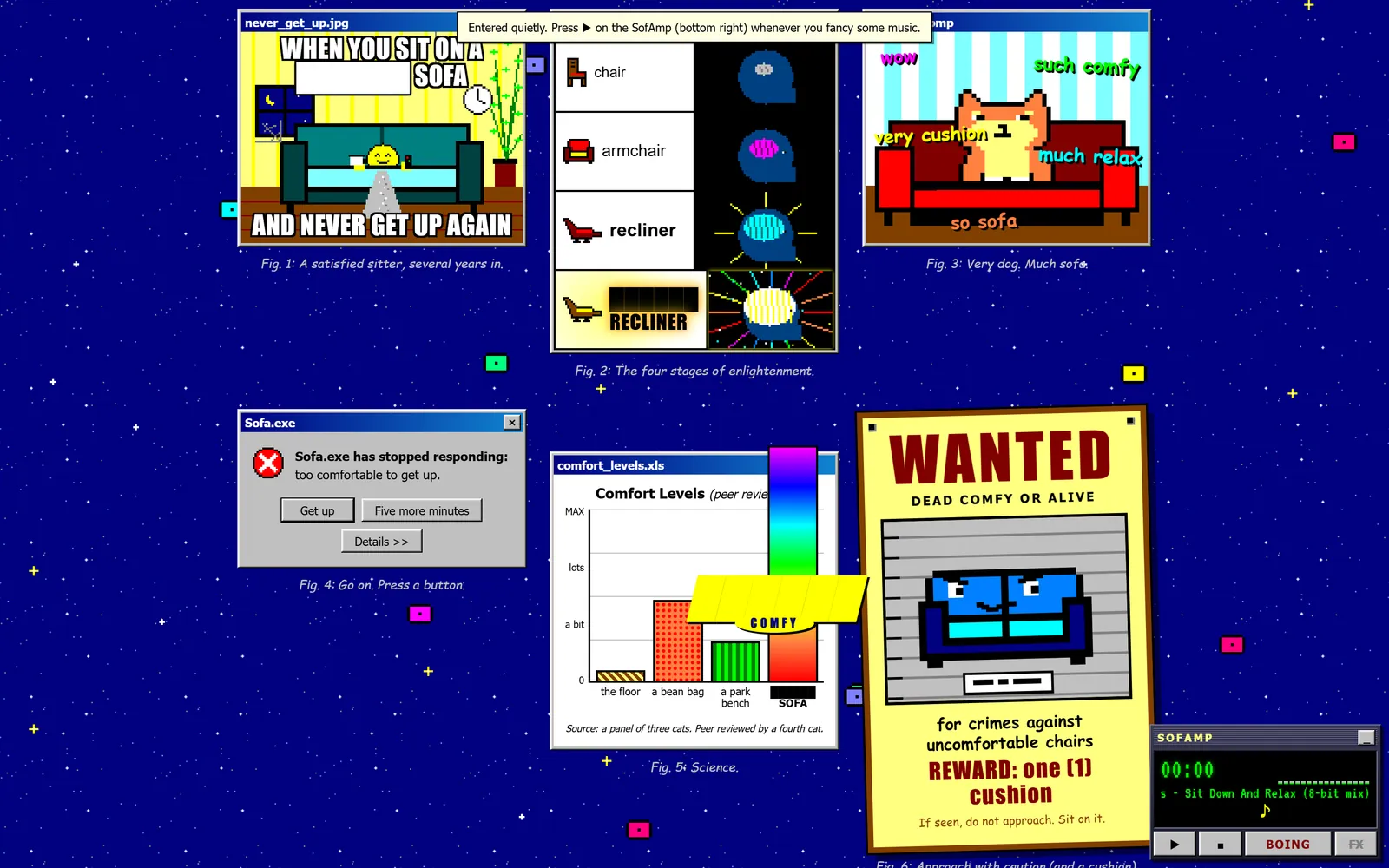
A 1999 GeoCities-style homepage hidden inside a modern shop's website. The only way to find it is to type in the address. It's got WordArt, a visitor counter that only ever counts you, a working MS Paint, a vault of pixel-art memes drawn in code, and a Winamp playing a chiptune made live in the browser. There's also a survey asking if this is the comfiest sofa ever, and the No button runs away from your mouse. And your finger.

A deliberately garish 1999-style homepage on a starry navy background: rainbow WordArt reading 'Furnishings' with the shop's name blacked out, 'certified comfy', an Under Construction banner and a visitor counter.
The shop's name is blacked out. The WordArt stays.
The Comfy Meme Vault: pixel-art memes about sofas, a 'Sofa.exe has stopped responding' error, a bar chart of comfort levels, and a 'Wanted: dead comfy or alive' poster.
The meme vault. Every pixel is drawn by code.
  • The guestbook turns whatever you type into a compliment about comfy furniture. It only saves in your own browser.
  • You can still press No with the keyboard. It argues with you, then gives in.
  • It even respects “reduce motion”, on a page made almost entirely of sparkles.
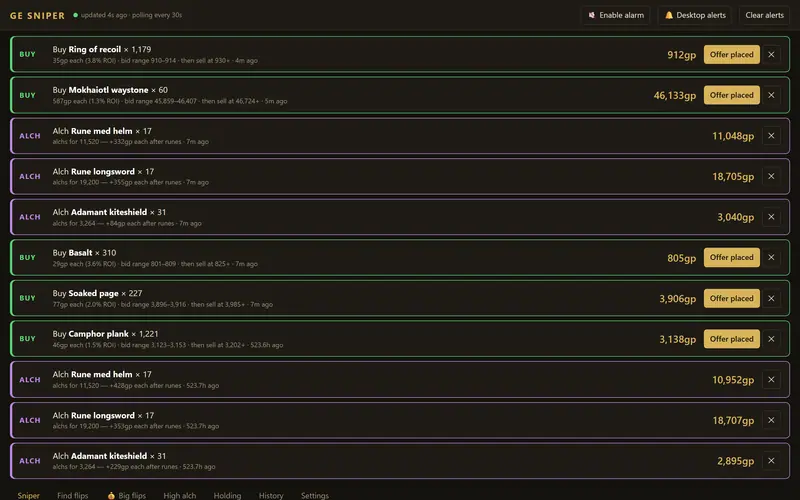
A dark, gold-accented dashboard listing Grand Exchange alerts: rows marked BUY or ALCH, with item names, quantities and expected profit.

Market analytics · 4,966 lines

GE dashboard

Keeps an eye on the Grand Exchange in Old School RuneScape and tells you when an offer's worth placing, and more importantly, when it isn't. Its “Edge” check throws out any flip where the price could drift more than the margin while you wait. It's caught fake bargains too, like a “19.7M profit” item that nobody had sold in a day. It only reads prices, it never touches the game.

Press Record, then move and click in the box.

Desktop utility · 976 lines

MouseRecorder

Records your clicks and mouse movements, then plays them back with timing accurate to about a millisecond. Useful for repetitive jobs, and for testing how much wobble a bit of software can take. It's a single PowerShell file that builds its own C# app when it starts, so there's nothing to install.

03 — How I work

What I steer by.

Three rules for every job, whatever its size. I learned most of them the hard way.

Tonight's sky

Looking north from Lincolnshire

Tonight · 22:00

Drag the glass across the sky

Each rule has a star: Polaris, and the two stars in the Plough that point to it.

  1. 01Polaris

    If someone who hates computers can't use it, it isn't finished.

    That means everyday words and one obvious job per screen, with anything you rarely need kept out of the way.

  2. 02Merak

    “It's all done” is never the whole report.

    You'll hear what I checked, how I checked it and on what, plus anything still left to do. A page loading doesn't mean it works.

  3. 03Dubhe

    If something breaks, it gets a test named after it.

    That way it can't quietly come back. One makes sure no email ever goes out starting “Dear {firstname}”. Another checks that the colour you type is the colour that gets saved.

04 — About

Hi, I'm Rob.

I build websites, tills and software for small businesses.

Most of what I build is used by people who'd rather not think about computers, so it has to hold up on a busy Saturday with nobody technical around. So far that's meant tills, back offices, a whole furniture shop's system, and pricing that always rounds the right way.

I'm also a massive nerd. In my spare time I make RuneLite plugins and port old games to PC, and now and then I build something for the fun of it, like a dungeon that teaches Python or a GeoCities page about sofas.

I'm a big believer in local businesses helping each other out, so if you've got a question about your website or your till, ask. You don't need to be hiring me.

05 — Write to me

Got a job in mind? Tell me about it.

A few lines about your business and what you need is plenty. It's just me here, so the reply comes from me.

robert@tideswell.dev