Robert Tideswell

EPOS and tills

Write to me

EPOS and tills for small businesses, that do a lot more than take the money.

The till I built for a café and tea room tracks stock by use-by date, prints kitchen tickets and date labels, runs the rota and does the cash-up at the end of the day. It all runs off one PC in the back room, the tablets connect over the shop's own network, and it keeps working if the internet goes down.

Fig. 1 — one till, the whole shop

What you get

One system instead of five.

  • Stock by the batch

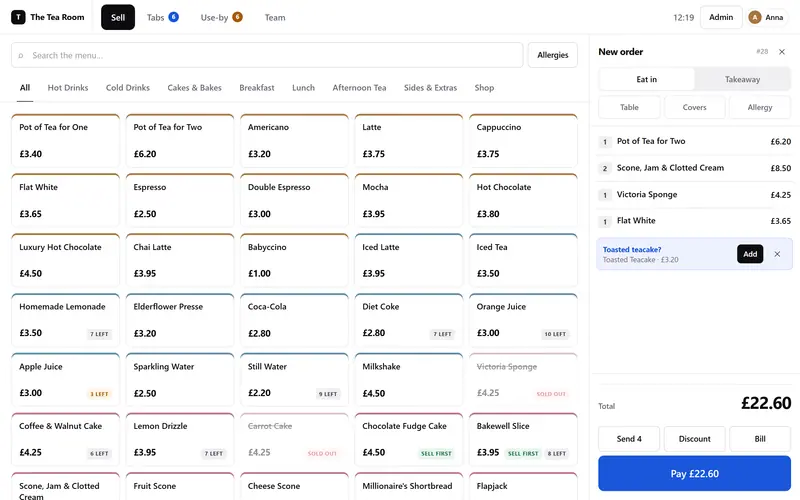
    It always sells the oldest use-by date first, won't let you sell anything out of date, and puts “Sell first”, “3 left” and “Sold out” on the buttons for you.

  • Works without the internet

    Everything runs on a computer in your shop, so if the broadband goes down, you can keep trading.

  • Printers that won't lose a sale

    Receipts, kitchen tickets and date labels on thermal printers. If a printer jams, the order still goes through.

  • Staff and the rota

    Staff clock in with a PIN, the rota spots any clashes, and their hours get checked against it. A manager can authorise something with their PIN without anyone logging out.

  • Where the money went

    Takings, VAT, ingredients, waste, wages and what's left, all on one screen.

  • Backups you can restore

    There's a second copy kept somewhere else, and if the till ever crashes, it restarts itself.

How it works

From the first chat to your first sale.

  1. Show me how you work

    What you sell, how you take payments and what happens when you close up. The till should fit around your shop, not the other way round.

  2. A plan and a price

    What it'll do, what hardware you'll need (you might already have some of it) and what it'll cost, all in writing before anything starts.

  3. Try it out first

    I'll set up a practice copy with your own menu and prices, so your team can practise before it goes live.

  4. Go live

    I'll help get it set up, show everyone how it works, and be around for the first few busy days.

From the work

The till I built for a tea room.

The till's sell screen: a grid of menu items with prices and stock badges such as 'Sell first' and '7 left', and an order on the right.

Till · the sell screen

A till that knows what goes off first

The stock badges come straight from the use-by dates, and the teacake is the till suggesting an add-on. There's a working cut-down version on the home page you can try.

Try it on the home page
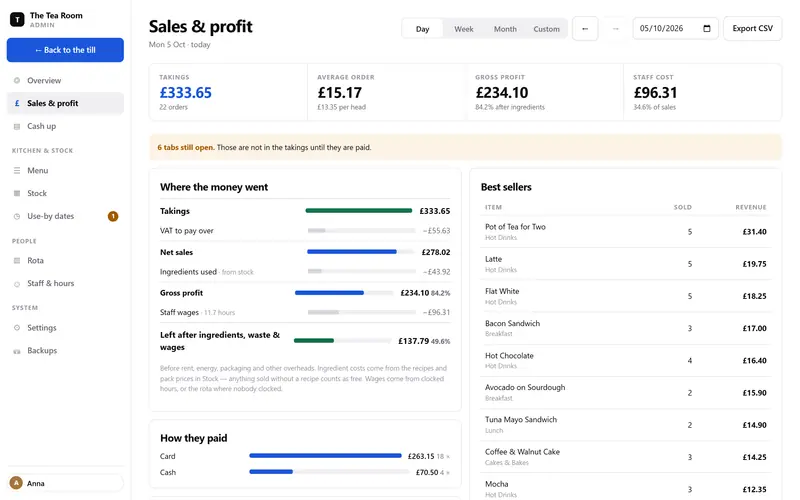
The Sales and profit screen, with a breakdown called 'Where the money went': takings, VAT, ingredients, gross profit, wages and what is left.

Back office · sales and profit

Where the money went

Takings, then VAT, ingredients, waste and wages, then what's left. The numbers are checked so every screen agrees with the others.

Read the case study
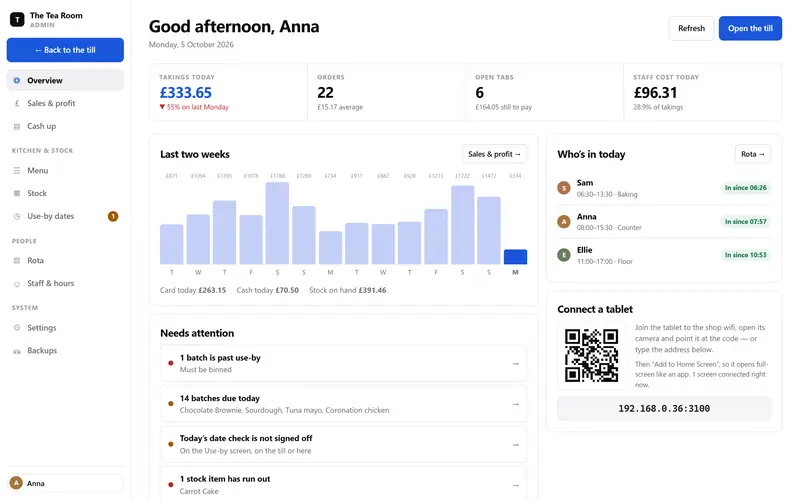
The till's back-office overview: today's takings and orders, a two-week sales chart, who's in today, and a list of things that need attention, such as batches due today.

Back office · the overview

What needs doing today

Who's in, what's due, what's run out and how today's going compared with last week, all before you open the doors.

Read the case study

Questions

Before you change your till.

How much does it cost?
You only pay once, with no monthly fee. Hardware's extra, and you might already have some of it. I'll give you a price in writing before anything starts.
Is there a monthly fee?
No. It runs on your own computer, so there's nothing to rent and no charge per tablet. If you'd like me on call for support, we can sort that out separately.
What if the internet goes down?
You keep trading. The till doesn't need the internet at all, it all runs on your shop's own network.
What hardware does it need?
An ordinary PC in the back, tablets for the counter and thermal printers for receipts and tickets. To add a tablet, you just scan a QR code.
Does it handle VAT?
Yes. It works out the VAT on every sale and keeps it separate, so the reports show you what's really yours.
Is it only for cafés?
The first one was for a café and tea room, but stock, staff and cashing up work pretty much the same in most small shops. Tell me how yours works and we'll see.

Write to me

Tell me how your shop works.

A few lines is plenty. What you sell, how many tills or tablets you'd need, and what drives you mad about your current setup.

robert@tideswell.dev